Is Your Link in Bio Costing You Wedding Enquiries? Why Your Website Is the Linktree Alternative You Need
Is Your Link in Bio Costing You Wedding Enquiries? Why Your Website Is the Linktree Alternative You Need
Picture a couple sitting side by side at a cake tasting, forks in hand, lovingly bickering over whether lemon & elderflower beats salted caramel (it doesn’t). I watched that exact moment from the other side of the table for years, back when I worked in a cake business and the excitement in that room was something else. Venue viewings are often a joint effort, but dress shopping and suit fittings usually happen separately, so the cake is one of the few things they actually get to taste and choose together. They arrived excited, every single time.
Now picture that same couple scrolling Instagram on the sofa, landing on your gorgeous grid and tapping the link in your bio. That tap carries the same excitement as walking into a tasting and what they find on the other side decides whether it keeps going or fizzles out somewhere between your bio and your enquiry form.
I'm Amber from Calluna & Thyme. I design Showit websites for wedding businesses, with 14+ years in the wedding industry behind me. Zoe and I met on Instagram, of course, then bonded on a call over her life in Spain and my slightly rusty Spanish, so when she invited me over to her blog it felt only right to talk about the little bridge between your Instagram and your website. Your link in bio and why the page behind it matters more than most wedding businesses think.
What actually happens when a couple taps your link in bio
By the time a couple taps your link, the hard work is done. Your content caught their eye, they've had a nosy through your grid and they like what they see enough to want more. Maybe they want a peek at your prices or maybe they're already itching to book a consultation. That one tap is them putting their hand up.
What they want next is simple: they want to land somewhere that feels like the next room of the same house, find the thing they came for and get there without thinking about it.
Every extra decision you put in front of them is a tiny hurdle and couples planning a wedding are juggling about forty tabs, a Pinterest board and a group chat with their mum and besties. Make it hard work and they'll head straight back to scrolling, and there's a decent chance they never make it to your website at all.
So your link in bio page isn't just a list of links. It's the very first impression your website makes, before your website has even loaded.
Why a generic Linktree throws the vibes off
Tiny confession…I'm not anti-Linktree. It's come a long way since I last used it, you can take payments through it now and for a lot of businesses it does a perfectly decent job. If a couple already knows they want to book you, a big button that says "Book your consultation" gets them there in one tap and that's lovely.
The problem is how most wedding businesses use it. They grab the free version, add a few links and leave it looking nothing like the rest of their brand.
Three taps, three different brands
You've spent ages getting your Instagram feeling just right. Your website (hopefully) matches it, with the same fonts, colours and overall feel. Then sitting right in the middle of the journey is a page with off-the-shelf styling and someone else's logo at the bottom.
Sometimes it's even messier than that, and the Instagram, the link page and the website all look like three completely different businesses. For a couple who were buzzing a second ago, that mismatch throws the vibes off. Nothing is technically broken, but it stops feeling like one thoughtful, polished business and starts feeling a bit thrown together. And when the vibes wobble, so does the urge to keep clicking.
Paying extra just to look like yourself
This is the bit that makes me chuckle. As of October 2026, the free Linktree plan keeps Linktree's branding on your page. Their Starter plan (£4.50 a month, or £3.50 a month billed annually) gives you a more personalised page, but removing the Linktree branding and unlocking custom designs needs the Pro plan at £8 a month, or £6.50 a month billed annually.
That's £78 to £96 a year to make a page look like your business, on top of whatever you already pay for your website. Even then, you're working within their design options, so if your website has soft rounded buttons and Linktree only gives you something close-ish, then close-ish is what your couples get.
If you’re already paying for your website, why pay for another app to create what you can create inside your website already?
The link in bio mistakes I see all the time
Even when the branding is spot on, what's on the page can trip couples up. If you spot your own link page in any of these, welcome to the group chat. I've seen every one of them more times than I can count, and luckily they're all easy fixes.
Too many links
The most common one by a mile. A link page with fourteen buttons isn't helpful, it's homework. Couples don't want to read through your entire business history to find the booking link and somewhere in the middle there's usually something that has no business being there anymore. An old giveaway maybe, or a collaboration from 2022 that has nothing to do with booking you today. Every extra link makes the important ones harder to find.
Your podcast feature sitting above your website
Getting featured on a podcast is a big deal and you should absolutely be proud of it. But when it's the first button on the page, it's in the spot that should belong to your website or your services. Couples tapping your link in bio are mostly there to find out about working with you, so the top of the page should make that easy. Your shiny features can live a little further down and still get plenty of love.
Labels that make couples guess
"Explore" and "My world" might sound cute, but they make couples guess what's behind them. Clear beats clever every time on a link page. "View our bridal gowns" or "Book your hair trial" tells someone exactly where they're going before they tap.
What to put on your link in bio page (and in what order)
If your wedding business website has a link in bio, this is the order I'd go for. It keeps the page short enough to scan in a couple of seconds and puts the most important bits where thumbs land first.
Your website, or your main services as individual links. If you only offer a few core services, give each one its own button so couples can go straight to the right page. If you'd rather send everyone to your homepage, one clear "Visit our website" button does the job.
Your booking link, whatever that looks like for you. Book a consultation, book your appointment, book your trial, whichever fits your business.
Contact, for the couples who want to ask a question before committing to anything.
Two to four extras that actually add value right now, like your most popular recent blog post, a podcast feature, an affiliate link or a tool or resource you love.
Keep it to that and you'll have a link page that looks considered rather than crammed. Any more than four extras and we're back to homework.
The Linktree alternative already built into your website
So…about that £96 a year. If your wedding business website is on Showit, you can build your link in bio page as a page on your own website, designed exactly like the rest of it. Same fonts, colours, button shapes, same everything. Couples tap the link in your bio and land on a page that's unmistakably your website and when they click through to your services, it feels like walking from one room into the next.
Every one of my Showit website templates for wedding businesses comes with a custom Instagram links page built in and every template customisation client of mine gets theirs designed to match their brand. And if you've ever wondered whether a template can really look like your business, I've written all about customising a Showit template to fit your brand. You can switch links in and out whenever you like, and include things like:
your logo and a photo of yourself, so couples know exactly who they've found
booking buttons that link to your calendar or enquiry form
a button for each of your key services
affiliate links, favourite resources and collaborations
your latest or most popular blog post
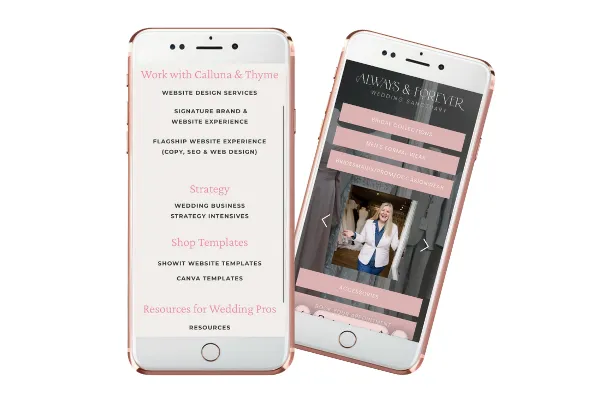
A wedding shop I designed a website for recently is the perfect example. She sells bridal gowns, men's suit hire, bridesmaids dresses, prom dresses and occasion wear, so her links page gives each one its own button. Someone looking for a suit taps "Suit hire" and goes straight to suits, without playing hide and seek on the homepage first.
[IMAGE: mobile mockup of Gail’s website (Always & Forever). Alt text: "Linktree alternative link in bio page on a Showit website for a bridal boutique business, shown on a mobile phone"]
There's a practical side too. Because the page lives on your website, you own it. Nobody can change their pricing or features from under you, and you can see how people use it in the same analytics you already check for the rest of your site. Showit plans start from $22 a month with hosting and your links page is simply part of that, rather than another subscription sitting on top (and you can use my affiliate code CALLUNATHYME at checkout for your first month free, on top of a 14 day free trial to try the platform too.
Quick wins if you're not ready to switch
Maybe you're not on Showit or not ready for a new website just yet and that's absolutely fine. You can still make your link in bio better today.
First, decide whether you actually need a link page at all. Lots of wedding businesses add one because everyone else has one, which is the one reason I'd never use. If your homepage already makes it crystal clear what you offer and how to book, linking straight to it is completely fine. Just make sure your services are easy to spot the second someone lands on it, and if you'd like a hand with that, here's what to put on your wedding business website homepage.
If you're keeping your Linktree, consider paying for the version that lets you match your branding, so the journey from Instagram to website feels like one business rather than three. Then have a proper tidy. Cut anything outdated, move your website and booking links to the top and rename any button that makes people guess.
Finally, try my favourite test. Pick up your phone, pretend you're a newly engaged couple who has just found you on Instagram and tap your own link in bio. How many taps does it take to find your prices or to book a call? Does anything make you pause or squint? If it's not easy for you, it definitely isn't easy for them.
And if you'd like to check the rest of your website with the same couple's-eye view, The Little Pink Book is my free website diagnostic for wedding businesses. It walks you through what your website is saying and how couples move through it, so you can see exactly where they might be slipping away, then gives you advice on how to fix it.
Ready to make your link in bio match your website?
Your Instagram does the hard work of catching a couple's eye, and Zoe is brilliant at helping wedding businesses get strategic and on top of that side of things (without wedding season swallowing your content plan whole). Your Instagram is where they get interested, your website is where they decide to book and your link in bio is the bit in the middle, and it deserves the same love as both of them.
If you'd like to try Showit before committing to anything, grab my free Showit welcome page template. It's a lovely way to have a play during Showit's 14-day free trial, and if you use my Showit discount code CALLUNATHYME when you sign up, you'll get an extra month free on top. Once you've had a play, my beginner-friendly guide to customising a Showit template in a week walks you through the rest.
And when you're ready for a website where your Instagram, your link page and every other page all look like they belong together, have a look at my Showit website templates for wedding businesses. Every single one comes with its own matching links page, ready for your Instagram link. If you're torn between a few, my guide on how to choose the right Showit website template for your wedding business will help you narrow it down, or you can take my Showit template quiz and let it pick for you.
If this got you thinking about how your Instagram and website work together, Zoe and I wrote a whole post on it called Your Instagram and website should be besties, not strangers. Make yourself a cuppa and grab a slice of cake (lemon, obviously), and give it a read!
Frequently asked questions about link in bio pages
What should a wedding business put in its link in bio?
Your website or main services first, then your booking link, then contact, then two to four extras that add value right now, like a popular blog post or a supplier you love working with.
Is Linktree free?
Yes, but the free plan keeps Linktree's branding on your page. As of October 2026, removing it and unlocking custom designs needs the Pro plan at £8 a month, or £6.50 a month billed annually.
What's the best Linktree alternative for wedding businesses?
A links page built into your own website, so it matches your branding and you own it. Every Showit template from Calluna & Thyme includes one, ready to customise.
Do I need a link in bio page at all?
Not always. If your homepage makes it clear what you offer and how to book, linking straight to it works well. A link page is worth having when it's planned around what couples are looking for.